Getting started on ChopWin takes just a few minutes. Registration is open to all Gambian players aged 18 and over, and the process is the same whether you’re signing up for the first time or returning after a break. You’ll need your phone number and a password to create your account, and your welcome bonus is credited automatically once you make your first deposit.
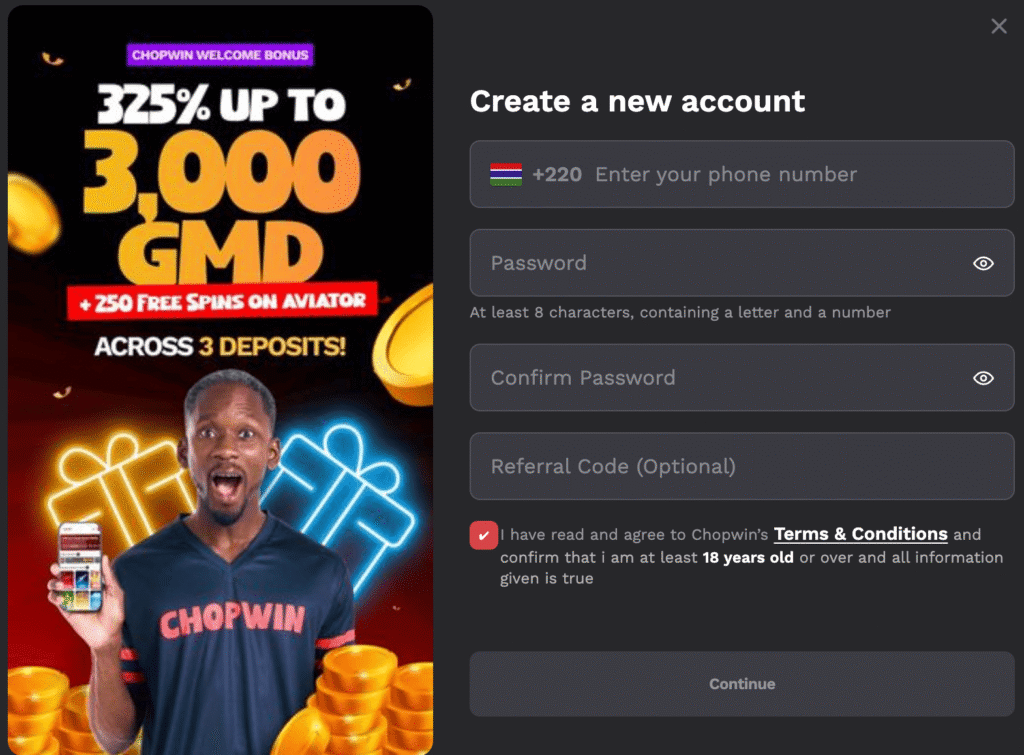
How to Register on ChopWin GM From Browser
- Go to the official ChopWin Gambia website on your phone or desktop browser.
- Click the purple registration button in the top right corner of the page.
- Enter your Gambian phone number — the +220 country code is pre-filled automatically.
- Create a password with at least 8 characters, including a letter and a number.
- Confirm your password.
- Add a referral code if you have one (optional).
- Check the box confirming you are 18 or older and agree to the Terms and Conditions.
- Tap Continue to complete your registration.
How to Register on ChopWin GM From the App
- Open the ChopWin app from your home screen.
- Tap the registration or sign-up option on the main screen.
- Enter your Gambian phone number — the +220 country code fills in automatically.
- Create a secure password with at least 8 characters, including a letter and a number.
- Confirm your password in the field provided.
- Enter a referral code if you have one (optional).
- Tick the box confirming you are 18 or older and agree to the Terms and Conditions.
- Tap Continue to finish creating your account.
Complete the Registration: The KYC Process
After registering, Chop Win GM may ask you to complete a KYC (Know Your Customer) verification. This involves submitting a valid ID to confirm your identity and age. Completing KYC ensures your account is fully verified and eligible for withdrawals.
Registration Problems? See Here How to Solve Them
- Phone number already registered: This means an account already exists with that number. Try logging in instead, or use the password reset option if you’ve forgotten your credentials.
- Password not accepted: Make sure your password is at least 8 characters long and includes both a letter and a number — spaces and special characters may cause issues.
- Page not loading during registration: Check your internet connection and try refreshing the page. Switching between Wi-Fi and mobile data can also help if the page is slow to respond.
- Referral code not applying: Referral codes must be entered during registration and cannot be added afterward. If the code isn’t working, double-check it with the person who shared it with you.
- Account suspended after registration: This may happen if the information provided doesn’t match verification requirements. Contact ChopWin support at hello@chopwin.gm or via WhatsApp at +2204574184 to resolve the issue.